Keep the useful details
Save architecture, decisions, fixes, and project rules as Markdown notes you can read and edit.
Codex, Claude Code, and your other coding agents.
Conversations, terminals, and project knowledge in one workspace.
Type a prompt, follow tool activity, and see the result.
Arrange terminals, launch Codex and Claude, and focus one agent beside the others.
Switch to the provider’s terminal interface in the same workspace.
Show the project rules your agents can recall, then explore their links.
Explore the relationships between project notes.
Enable a skill, edit its Markdown instructions, and save the update.
Read added and removed code, then scroll through the full change.
Resize the browser preview and inspect the mobile layout beside your work.
Rendered app screens with cursor actions and sample content. Feature availability depends on your provider and setup.
One workspace for the agents you already use
 Codex
Codex Claude Code
 Cursor
 Grok
Grok OpenCode
Consept isn’t just a place to chat.
It’s a place to bring the work together.
Give each project a home for its conversations, files, and decisions. Add context, follow progress, and queue what comes next.
Type a prompt, follow tool activity, and see the result. Silent app walkthrough with sample content.
Stay focused in CLI, or arrange several terminals on Canvas. Your projects and saved work stay close at hand.
Arrange terminals, launch Codex and Claude, and focus one agent beside the others. Silent app walkthrough with sample content.
Switch to the provider’s terminal interface in the same workspace. Silent app walkthrough with sample content.
Move from a conversation to Canvas, drag an agent window, and arrange the workspace. Silent app walkthrough with sample content.
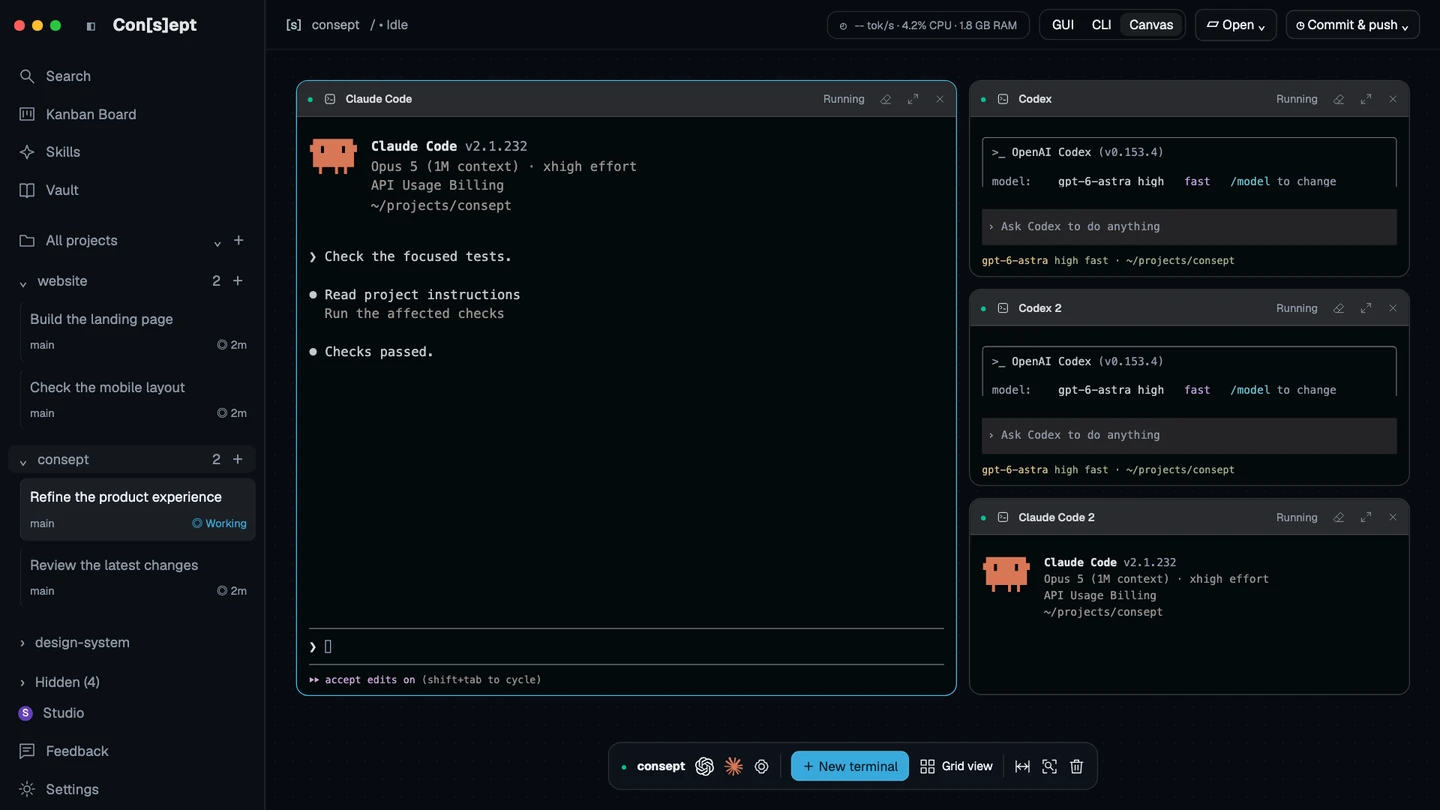
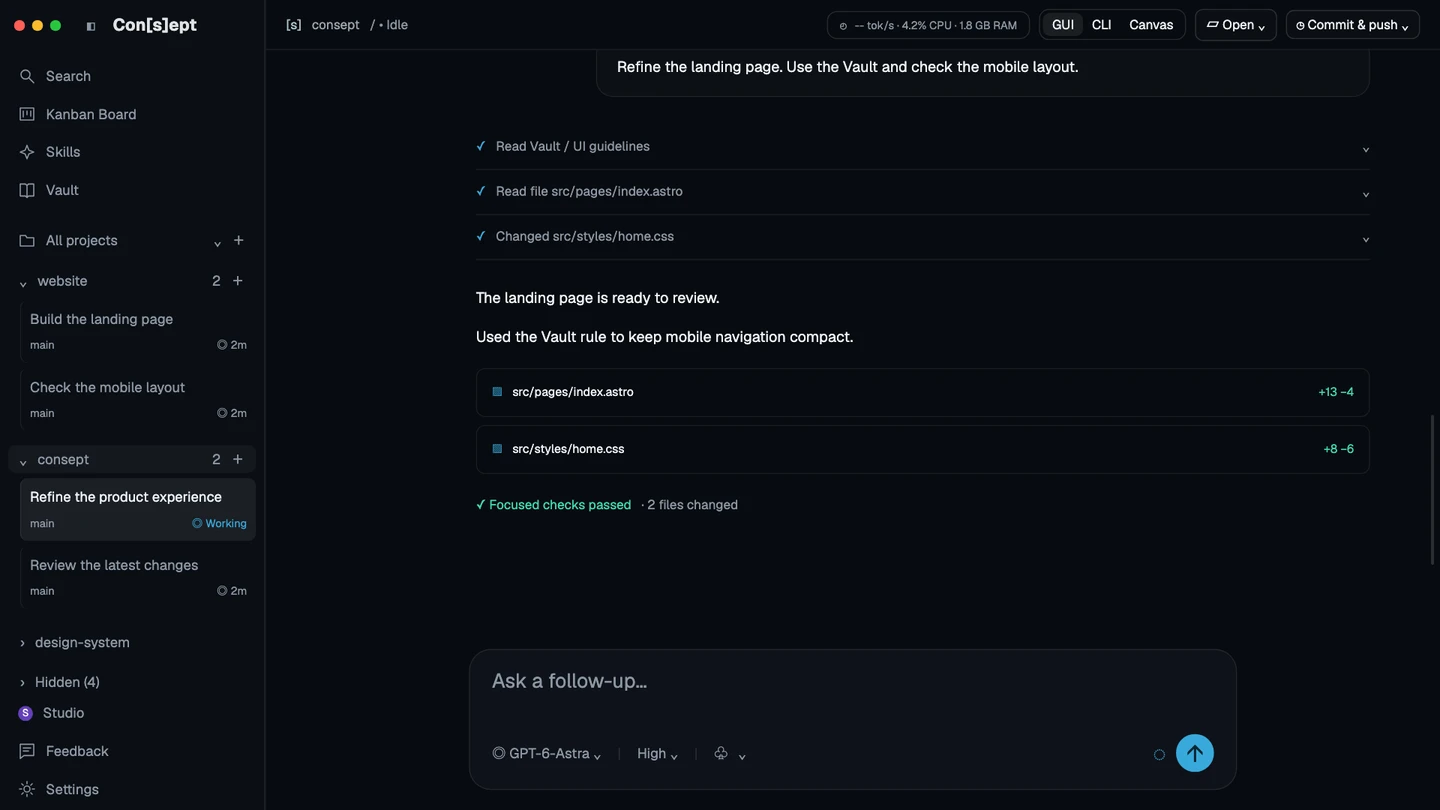
Drag to explore both views · Illustrative product screens
Stop explaining the same project decisions. With Vault enabled, supported agents can create and update Markdown (.md) files beside your code, then find relevant notes in a new chat. Your project knowledge stays in files you can read and edit.
Explore the relationships between project notes. Silent app walkthrough with sample content.
Every node is a Markdown (.md) file. Every line is a link between notes. See how decisions, architecture, fixes, and project rules connect across your whole project.
Show the project rules your agents can recall, then explore their links. Silent app walkthrough with sample content.
Read what the Vault does, then scroll through the Markdown note. Keep decisions, design rules, and useful fixes ready for future work.
Illustrated project with sample notes. Agent access requires Vault setup and a supported provider.
Save architecture, decisions, fixes, and project rules as Markdown notes you can read and edit.
Supported agents can search the same project Vault, so useful knowledge can outlast a single conversation.
Link decisions to related notes. Search for a detail or explore how it fits into the project.
Agents can update notes as the project changes. You can review and edit those notes at any time.
Keep personal instructions, project guidance, and reusable skills in one place. Give your agents a clear starting point for the way you work.
Enable a skill, edit its Markdown instructions, and save the update. Silent app walkthrough with sample content.
Organize tasks by status on the Kanban Board. Silent app walkthrough with sample content.
Read added and removed code, then scroll through the full change. Silent app walkthrough with sample content.
Resize the browser preview and inspect the mobile layout beside your work. Silent app walkthrough with sample content.
Work locally, connect to your development server, or pair another device. Consept connects to the environment you control.
Remote access needs network and environment setup. Provider data policies still apply.
Return to projects on a configured local or remote environment. Silent app walkthrough with sample content.
Both plans include full access to Consept. Choose monthly or make it yours for life.
Requires a Mac with Apple Silicon (M-series). Intel Macs are not supported.
Your agents, tools, and project knowledge together.
$19/ month
Billed monthly
Full access and updates while subscribed
Buy monthlyBuild for years. Pay just once.
$129one time
No recurring payments
One purchase. A workspace for the long run.
Buy lifetimeChat, CLI & Canvas. Vault, Skills & source control. All included.
Bring your own coding providers. Their subscriptions and API usage are separate.
Sign in or create an account to continue. Use the same account in the macOS app.
Cancel at least 24 hours before your next billing cycle to avoid the next monthly charge. Open your account and select Manage billing to cancel.
Refunds are available within three days of your first purchase. Monthly renewal payments are not refundable.
One payment of $129 includes full access to Consept and all future updates. Coding provider subscriptions and API usage are separate.
Download the macOS app whenever you like; no account is needed for that. Your purchase is linked to your Consept account, and the app unlocks when you sign in with that same account.
Quick answers about providers, privacy, your workspace, and getting started.
Consept is a workspace for coding agents. Keep chats, terminals, project files, and reusable knowledge together while your existing provider does the work.
Consept supports Codex, Claude Code, Cursor, Grok, and OpenCode. You configure the provider and its credentials in your environment. Available models and features depend on that provider.
The Vault stores Markdown notes for each project. You can create, search, edit, and link notes, then explore their relationships. Supported agents can recall and update this knowledge when Vault access is configured.
Yes. Use CLI for a focused terminal or Canvas to arrange several terminals. Saved agent sessions can be reviewed and resumed when you enter the relevant workspace view.
Consept runs in an environment you control. Your selected coding provider may send prompts and code to its service. Check that provider’s data policy and your permissions before sharing sensitive content.
Yes. Configure a local network, tailnet, SSH, or supported relay connection, then pair your client with the environment. Each environment keeps its own projects, credentials, and state.
Consept costs $19 per month or $129 as a one-time payment. Both plans include full access to Consept. Lifetime access includes all future updates. Coding provider subscriptions and API usage are separate. Download the app first — an account and a plan are only needed to use it.
Now. The macOS installer downloads immediately, with no account needed. Sign in or create your account when you open the app.
Find your workflow
Use the provider you know, bring several tasks into view, or give the next session useful project context.

Your agents. Your projects. One Con[s]ept.