Project Vault · editable knowledge
AI coding agent memory you can read and edit.
Consept Vault keeps project knowledge in a local Markdown notebook. Save architecture decisions, working rules, and resolved problems so supported future sessions can find them.
Apple Silicon Mac · 7-day trial for eligible new accounts
A closer look
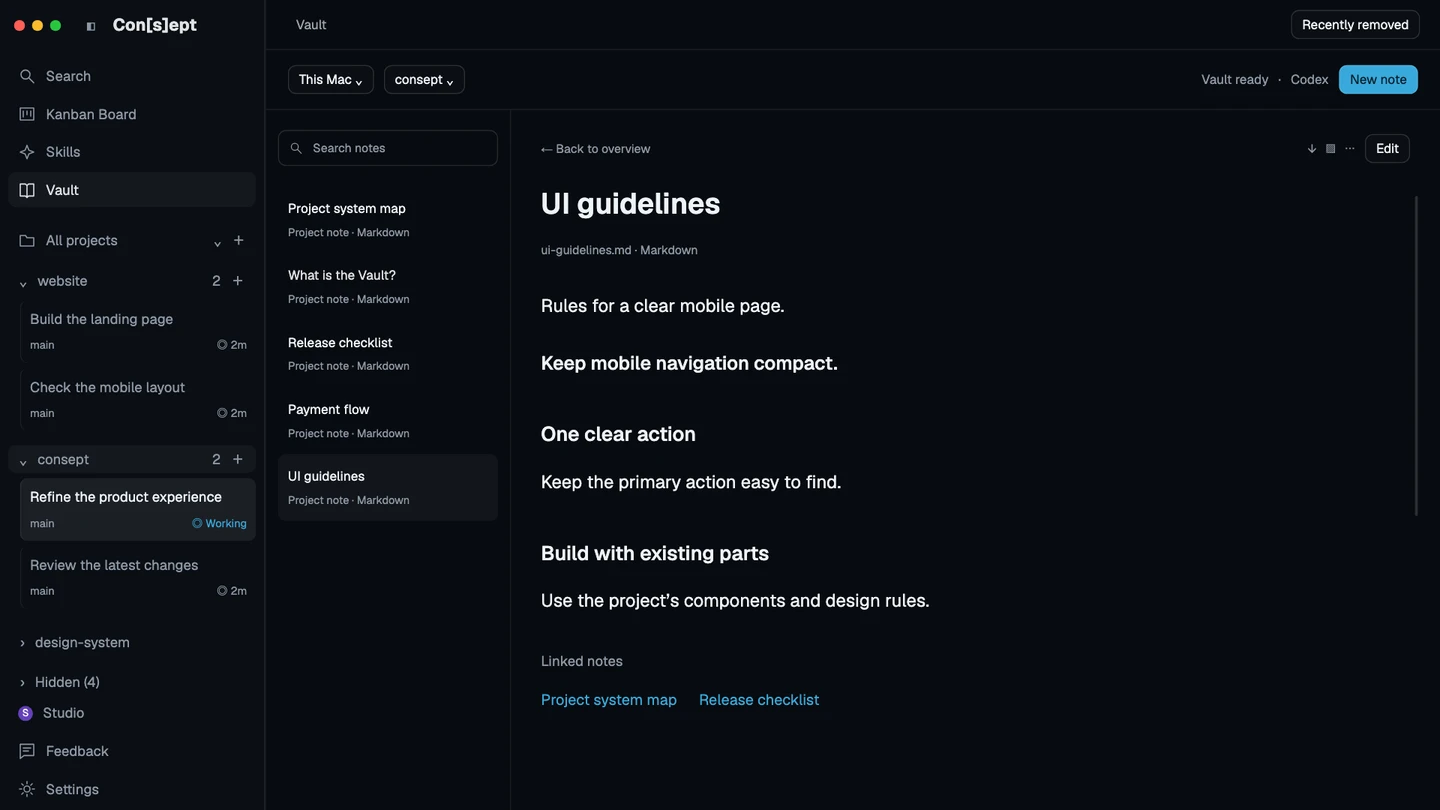
Keep the decision after the conversation ends.
A chat transcript records what happened. A useful project note explains what the next session needs to know: why a module exists, which flow a change affects, or why an earlier approach failed. Vault gives that knowledge a separate home inside the registered project directory.
The notebook is shared by supported provider sessions working in that same registered project. Switching from Codex to Claude can reuse those notes after the matching setup is enabled. It starts a fresh provider conversation; it does not transfer the old transcript or guarantee that every note will be recalled.
Editable Markdown, scoped to the project
Create and edit notes yourself, search their text, and remove or restore notes through the UI. Each project has its own Vault. Your notebook does not become global instructions for every repository.
Links that explain the relationships
Connect related notes and explore their graph. Use a short project system map to point to architecture, product flows, and known constraints instead of putting every detail into one long instruction file.
Agent access with visible setup
When supported, enabling Vault installs a project-local provider skill. Open a new session to use the updated setup. Available modes depend on the provider and environment; unsupported combinations keep a manual notebook.
From setup to review
Build useful memory in three steps
Enable the project’s Vault
Open Vault in the sidebar, select the intended project, and review what Consept will create. Enable the available notebook and provider integration.
Start with a small system map
Record the project’s main components and links to the most useful domain notes. Add current file paths so future work can verify the notes against the source.
Keep the knowledge current
Open a new supported agent session after setup. Ask it to use relevant notes and preserve durable decisions. Review the notebook as the product changes.
Setup references
Official documentation for the tools used in this workflow.
Product guide by Consept · Reviewed
Choose your workflow
More than a longer conversation
Vault is useful when you need a shared, inspectable project notebook across sessions. It can work alongside provider-native instructions and memory. Agent note-taking remains best effort, and current source and tests remain the evidence for a change.
Questions about Project memory for coding agents
Which agents can use the project Vault?
Supported and configured Codex and Claude Code setups can use agent notes. Availability depends on the provider, version, permissions, and environment. The UI shows the available mode; an installed skill alone does not prove readiness.
Where are the notes stored?
Each enabled project stores Markdown notes in its own .consept-vault directory at the registered workspace root. You can read and edit them through the Vault UI.
Does Vault remember every chat automatically?
No. Vault is a curated project notebook, not a transcript archive. An agent can miss useful information or write a weak note. You can review and edit the notes, and ask for specific durable decisions to be recorded.
Does agent memory work in every worktree?
No. Managed worktree threads and projects whose registered root is a linked Git worktree support only the manual notebook. For supported CLI or Canvas agent access at a main project root, enable the matching project skill and open a new terminal there.
What do I need to try Consept?
Download the app on an Apple Silicon Mac, then sign in. Eligible new accounts get seven days from their first app login, with no card required. After the trial, Consept costs $19 per month or $129 for lifetime access. Provider subscriptions and API charges are separate. See plans and pricing.
Your project. Your next step.
Try it on a real task.
Download Consept, connect your provider, and open the project you want to work on.
Download for macOSNo account needed to download. Sign in when you open the app.