Canvas · terminal sessions
Run parallel coding agents with room to see the work.
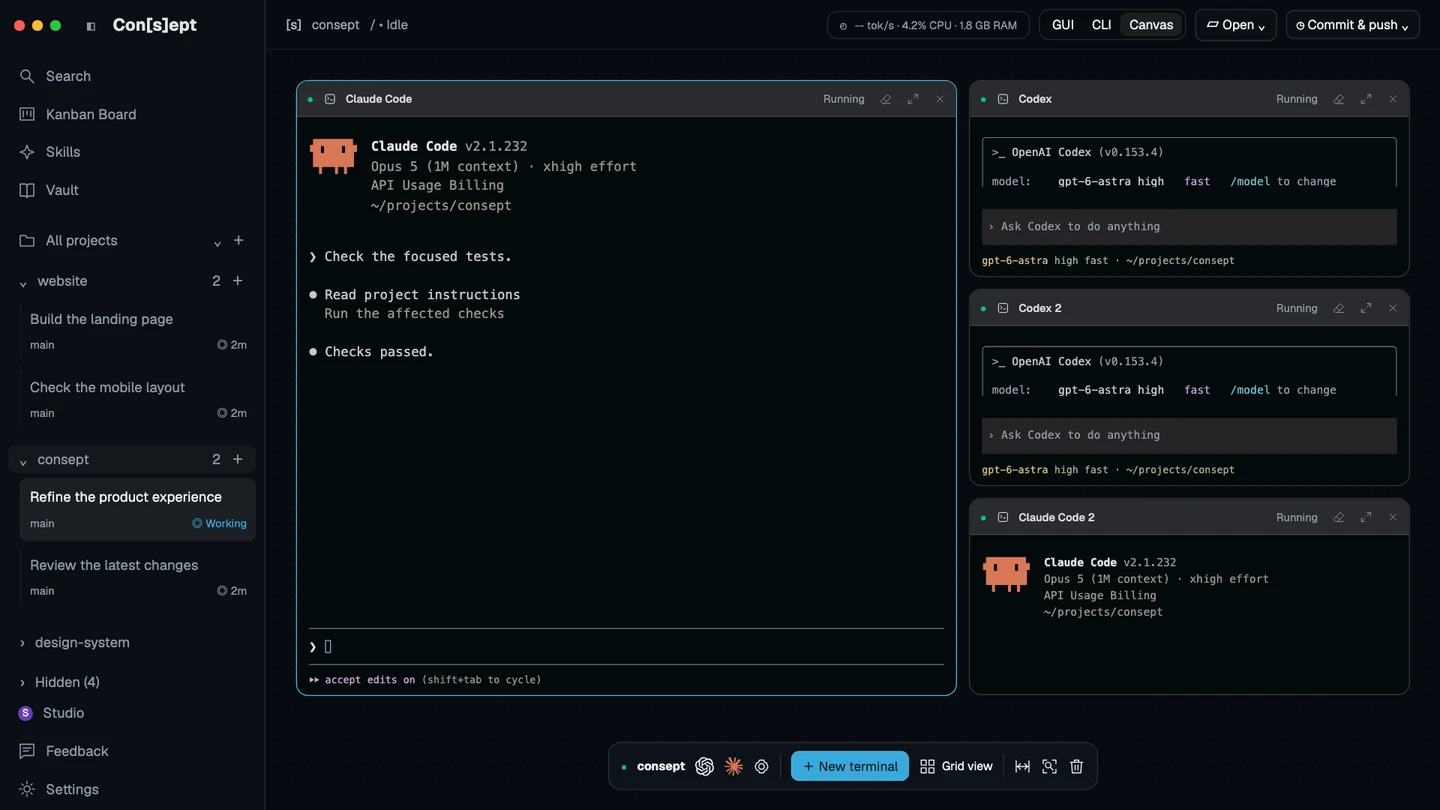
Consept Canvas lets you arrange several terminals in one workspace. Keep a Codex session, a Claude Code session, and the commands you need within view as you direct each task.
Apple Silicon Mac · 7-day trial for eligible new accounts
A closer look
Make parallel work easier to follow.
Parallel coding agents are useful when the tasks are independent: one can inspect a failing test while another reviews documentation or a separate project. Canvas gives these terminal sessions visible places, so you can check progress and focus the session that needs your input.
The terminal layout is not a code-isolation boundary. Two agents editing the same files can still conflict. Use separate working directories or deliberate Git worktrees when tasks need independent changes, and review how their results fit together before integration.
Arrange the sessions around the task
Use Canvas for several terminals, then focus an individual terminal when you need to read its output closely. Keep supporting commands nearby rather than mixing every command into one agent conversation.
Use the underlying provider CLI
Launch supported coding providers in their terminal interfaces. Each session uses its configured provider, account, and permissions. Several running sessions can consume provider limits and machine resources at the same time.
Recover saved agent conversations
A client reconnect can reattach to a still-running terminal. After a server or desktop restart, Consept restores the layout with fresh shells and offers supported saved Codex and Claude session recovery. It does not recreate arbitrary shell state.
From setup to review
Start with two independent tasks
Define the boundaries
Choose tasks with different files or separate working directories. State the expected result and checks for each agent before starting either session.
Arrange the terminals
Open Canvas and create the terminals you need. Start the chosen provider in each, then arrange the panes so you can follow their output.
Bring the results together
Review each task’s diff and tests. Resolve overlapping changes deliberately and run the checks for the combined result before committing or merging.
Setup references
Official documentation for the tools used in this workflow.
Product guide by Consept · Reviewed
Choose your workflow
A visible workspace, with explicit task boundaries
Use Canvas when a single terminal hides too much of the work. Start with a small number of sessions you can supervise. The benefit comes from independent tasks and clear review, not from running the largest possible number of agents.
Questions about Parallel coding agents
Can Claude Code and Codex run side by side?
Yes, with both providers installed and authenticated. Open separate terminals in Canvas and start the provider required for each task.
Does each Canvas terminal get an isolated worktree?
No. Arranging terminals does not by itself isolate their files. Choose separate directories or create deliberate worktrees when independent code changes need isolation.
Do running agents survive an app restart?
A restart creates fresh shells. Consept can offer saved-session resume for supported Codex and Claude conversations when the provider saved them. A browser reconnect to a live server is a different case and can reattach to the existing terminal.
Does parallel work cost more?
Each agent session uses its provider’s limits and billing. Running several sessions may increase usage and resource consumption; Consept access does not include provider credits.
What do I need to try Consept?
Download the app on an Apple Silicon Mac, then sign in. Eligible new accounts get seven days from their first app login, with no card required. After the trial, Consept costs $19 per month or $129 for lifetime access. Provider subscriptions and API charges are separate. See plans and pricing.
Your project. Your next step.
Try it on a real task.
Download Consept, connect your provider, and open the project you want to work on.
Download for macOSNo account needed to download. Sign in when you open the app.