Claude Code · macOS
A Claude Code GUI with room for the whole project.
Consept gives Claude Code a shared workspace for conversations, terminals, files, and review. Bring your Claude login, open a project, and keep the work beside the conversation.
Apple Silicon Mac · 7-day trial for eligible new accounts
A closer look
Keep the task and its context in the same place.
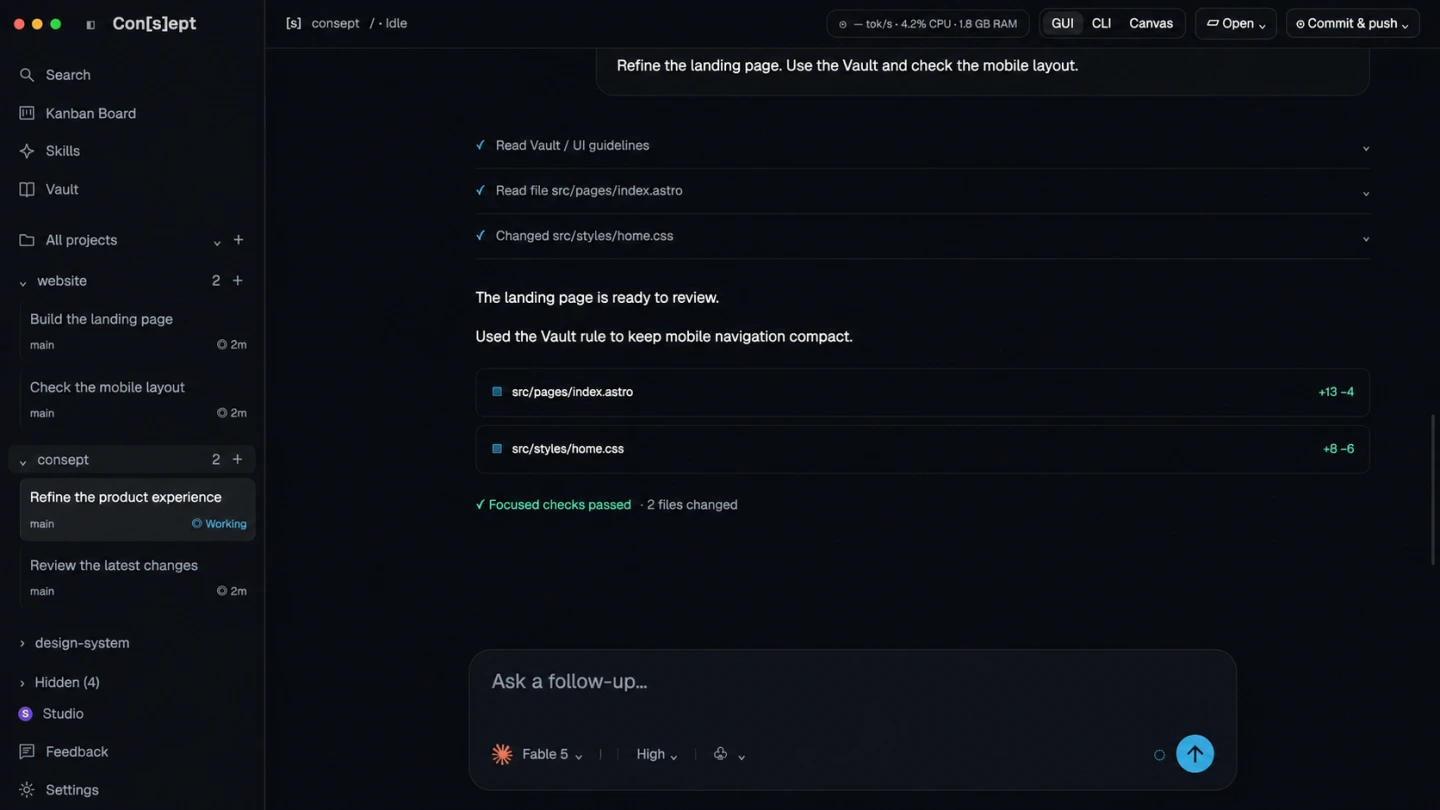
A longer Claude Code task involves more than a prompt. You need to find the right project, inspect a file, follow tool activity, and check what changed. Consept groups these parts around project threads so you can return to the work with its history visible.
Use GUI for a conversation, CLI for a focused provider terminal, or Canvas when you need several terminals in view. These are different ways to work in the same project; a new provider conversation does not automatically inherit another conversation’s transcript.
Use your Claude configuration
Consept uses your installed Claude Code provider. Keep the default configuration for one account, or set up separate named providers for work and personal configurations. Separate Claude config directories stay isolated.
Follow changes through to review
Read the agent’s response and tool activity, inspect project files, and review added and removed code. Keep a focused follow-up in the same thread instead of starting the explanation again in another window.
Keep useful decisions in project notes
Enable a project Vault to save editable Markdown notes about architecture, product rules, and resolved problems. Agent access requires a supported Claude setup and a new session after activation.
From setup to review
Start a Claude Code project in Consept
Install and sign in
Download Consept on an Apple Silicon Mac and sign in to the app. Install and authenticate Claude Code separately, then check its provider entry in Settings.
Open your project
Add the project directory and start a thread with the Claude provider. Give the agent a bounded task and point it to the relevant files.
Review the result
Follow the work in chat, open a terminal when needed, and check the diff and tests before committing. Save durable decisions in the project Vault.
Setup references
Official documentation for the tools used in this workflow.
Product guide by Consept · Reviewed
Choose your workflow
When is a separate Claude Code GUI useful?
Claude Code already has official graphical interfaces. Consept is useful when you want Claude alongside other coding providers, with project organization, terminal layouts, and an editable knowledge notebook in one app. It is an independent product, not an Anthropic application.
Questions about Claude Code GUI
Does Consept include Claude access?
No. You need your own supported Claude Code login or provider configuration. Claude subscription and API charges are separate from Consept access.
Can I use Claude Code and Codex in the same app?
Yes. Configure each provider and choose the one you need for a thread or terminal session. Separate sessions keep their own conversations; a configured project Vault can supply shared project notes.
Can I switch work and personal Claude accounts in a thread?
Existing Claude threads stay with compatible providers using the same configuration directory. Start a new thread for a provider with a different configuration directory.
Does a local workspace mean code never leaves my Mac?
Project files and Consept state live in your environment. Claude Code can send prompts and code to its service. Its data policy and your permissions still apply.
What do I need to try Consept?
Download the app on an Apple Silicon Mac, then sign in. Eligible new accounts get seven days from their first app login, with no card required. After the trial, Consept costs $19 per month or $129 for lifetime access. Provider subscriptions and API charges are separate. See plans and pricing.
Your project. Your next step.
Try it on a real task.
Download Consept, connect your provider, and open the project you want to work on.
Download for macOSNo account needed to download. Sign in when you open the app.