BridgeMind · macOS alternative
BridgeMind alternative with editable project memory.
Compare BridgeMind with Consept for ongoing project work on Mac. Keep threads, files, and agent terminals together, with an editable Vault for project decisions and working notes. Try it with the coding agents you already use.
Apple Silicon Mac · 7-day trial for eligible new accounts
A closer look
BridgeMind basics and use cases.
BridgeMind is an "Agent Super App": one native desktop window for working with AI coding agents. Agent mode runs named agents on recurring routines that you review later. Code mode hosts the CLIs you already have — Claude Code, Codex, Cursor Agent, Gemini CLI, Copilot, and Grok Build — in real terminals over your folders. Thread mode reads a coding session as a conversation instead of a terminal.
It ships for macOS 14.0 or later, Windows, and Linux. Pro is the only plan: $50/month or $480/year, which includes 12,500 credits a month for metered in-app features like voice orchestration. Provider subscriptions — Claude, ChatGPT with Codex access, SuperGrok, or your own API keys — are billed separately from BridgeMind.
Visual Canvas layouts
Arrange Consept terminal sessions in Canvas and keep several tasks in view. Compare the layout and navigation with BridgeMind using the tasks you run each day.
Editable project knowledge vault
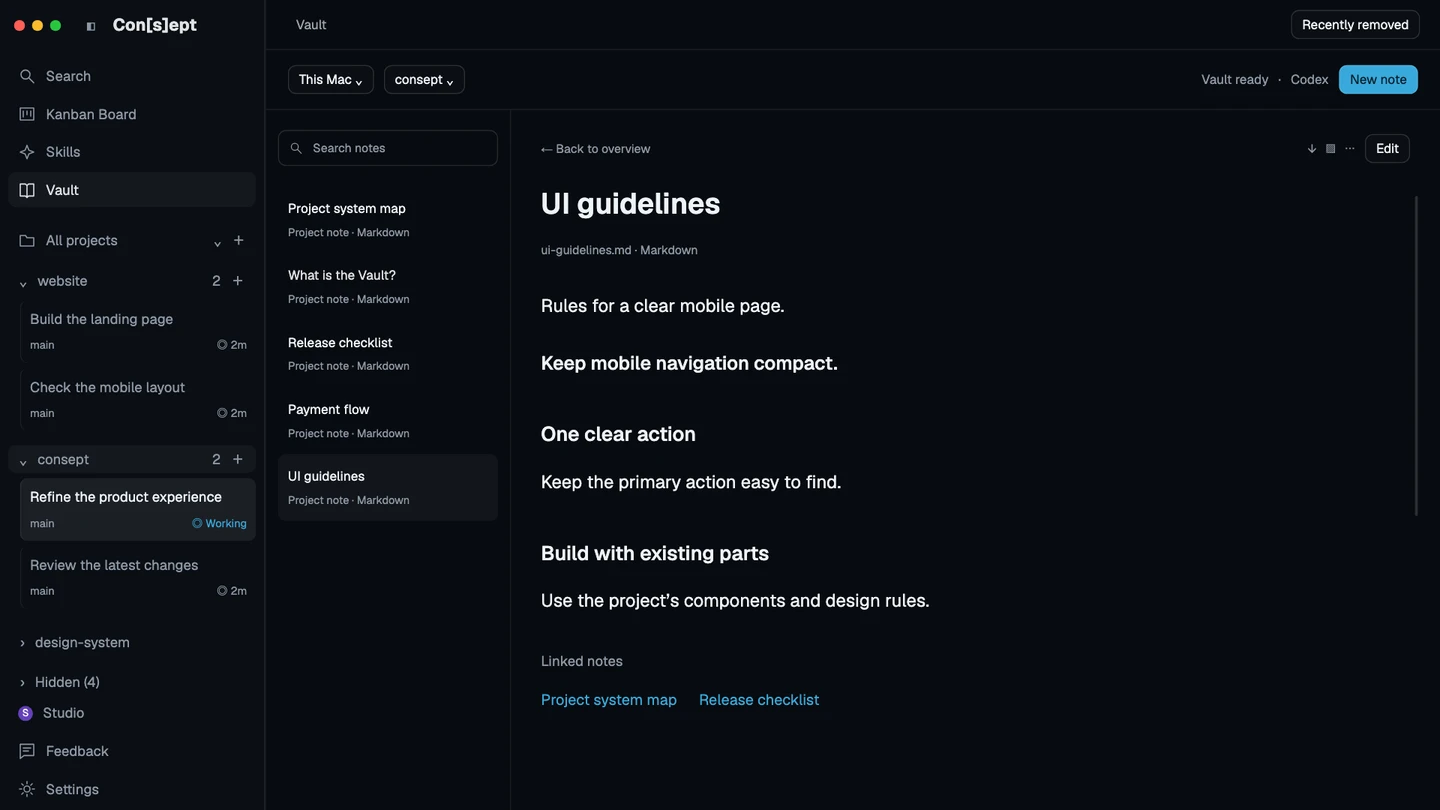
Consept Vault stores editable Markdown notes that AI sessions can search and update. Keep architecture decisions and working rules in a shared, editable knowledge base tied to each project.
Project-level organization
Organize all AI agent work by project. Each project has its own threads, terminals, files, and knowledge vault. BridgeMind organizes around your folders and agent sessions.
Integrated code review
Review added and removed code beside the conversation and check tests before committing. BridgeMind shows a changes panel next to thread sessions; Consept keeps review inside the project workspace.
From setup to review
Set up BridgeMind for agent work
Download and sign up
Create an account at bridgemind.ai and download the native build for your platform: macOS 14.0 or later, Windows 10/11, or Linux. Sign in and start a Pro subscription — $50/month or $480/year — since the app is not free.
Connect your coding agents
BridgeMind launches the coding CLIs already on your PATH, such as Claude Code, Codex, Cursor Agent, Gemini CLI, Copilot, or Grok Build. Keep your own subscriptions or API keys; usage is billed through those accounts.
Run routines and vibe code
Put a named agent on a recurring routine and review results in Agent mode, or describe the work in Code mode and let an agent in a real terminal make the changes over your folder.
Fair comparison
How BridgeMind compares to Consept
What BridgeMind does well
BridgeMind hosts the coding CLIs you already use — Claude Code, Codex, Cursor Agent, Gemini CLI, Copilot, and Grok Build — in one native desktop app, so you do not need to switch tools to move between agents. Agent mode puts named agents on recurring routines that you review later, and Thread mode turns a coding session over a local folder into a readable conversation with a changes panel. It ships for macOS, Windows, and Linux, and pricing is a single Pro plan at $50/month or $480/year with a 7-day money-back guarantee on first-time purchases.
Which workflow fits your project?
BridgeMind includes terminal layouts, coding threads, and scheduled agents. Compare that workflow with Consept's project organization, Canvas, and editable Markdown Vault. Test how each app helps you find past work, review changes, and keep project decisions useful across sessions.
When to choose Consept
Choose Consept if you want project threads, terminal layouts, code review, and editable knowledge together on Mac. Use Vault for project decisions and working notes that you can inspect and change. Supported agent sessions can search and update those notes when enabled; automatic recall depends on provider setup.
Sources
Research references for the comparison.
Competitor analysis by Consept · Reviewed
Questions about BridgeMind Alternative
Does BridgeMind include Claude, Codex, or Grok usage?
No. BridgeMind Pro is $50/month or $480/year and includes 12,500 credits a month for metered in-app features. You still need your own Claude subscription, ChatGPT plan with Codex access, SuperGrok, or API key, and provider usage is billed separately.
How does Consept compare with BridgeMind?
Both bring coding agents into a desktop workspace and offer terminal layouts. Compare how you organize ongoing work: Consept combines project threads, Canvas, code review, and an editable Markdown Vault. Try these with your own project and provider accounts.
Does Consept work on Apple Silicon Macs?
Yes, Consept is native for Apple Silicon Macs and optimized for M1, M2, M3, and later chips.
Can I import my BridgeMind notes?
Consept Vault uses editable Markdown notes per project. You can copy your BridgeMind documentation and notes into the Vault so your agents can search and update them.
What do I need to try Consept?
Download the app on an Apple Silicon Mac, then sign in. Eligible new accounts get seven days from their first app login, with no card required. After the trial, Consept costs $19 per month or $129 for lifetime access. Provider subscriptions and API charges are separate. See plans and pricing.
Your project. Your next step.
Try it on a real task.
Download Consept, connect your provider, and open the project you want to work on.
Download for macOSNo account needed to download. Sign in when you open the app.