Your all-in-one
workspace
for coding agents.
Bring Codex, Claude Code, Cursor, Grok, and OpenCode together. Chats, terminals, and project knowledge. One workspace. Your providers.
Apple Silicon View plans
Built around the way you work
Your agents, tools, and project knowledge. All together.

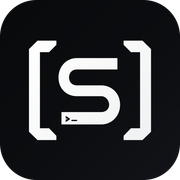
Keep agent conversations, terminals, and code changes together in one workspace.
Keep decisions and useful project knowledge in linked Markdown notes.
Inspect what changed alongside the conversation before you commit.
Keep work organized by project and return to saved conversations.
Find reusable instructions for the supported agents working on your project.
Create a pull request from your project when the changes are ready.
Connect related notes so project decisions have context for the next task.
Run your workspace in an environment you control, with your files and tools.
Commit, pull, and push without losing sight of the task you are working on.
Move between a conversation, a focused CLI, and your Canvas arrangement.

Use the Claude Code account you already have, with a place to organize the work.
Use a focused terminal or arrange several agent terminals on Canvas.

Bring Cursor into the same project workspace as your other coding providers.

Connect Grok with your provider credentials and choose the work to run.

Use OpenCode alongside Codex, Claude Code, Cursor, and Grok.
Keep your existing provider accounts. Provider usage is billed separately.
Review and resume saved agent sessions in the relevant workspace view.
Choose a supported provider for the task. Models and features depend on setup.
Supported agents can find and update project notes when Vault access is enabled.
Bring your agents, conversations, terminals, and project knowledge together.
Keep agent conversations, terminals, and code changes together in one workspace.
Use a focused terminal or arrange several agent terminals on Canvas.
Keep work organized by project and return to saved conversations.
Use OpenCode alongside Codex, Claude Code, Cursor, and Grok.
Connect related notes so project decisions have context for the next task.
Choose a supported provider for the task. Models and features depend on setup.
Move between a conversation, a focused CLI, and your Canvas arrangement.
Use the Claude Code account you already have, with a place to organize the work.
Inspect what changed alongside the conversation before you commit.
Connect Grok with your provider credentials and choose the work to run.
Create a pull request from your project when the changes are ready.
Review and resume saved agent sessions in the relevant workspace view.
Commit, pull, and push without losing sight of the task you are working on.
Bring your agents, conversations, terminals, and project knowledge together.
Keep decisions and useful project knowledge in linked Markdown notes.
Bring Cursor into the same project workspace as your other coding providers.
Find reusable instructions for the supported agents working on your project.
Keep your existing provider accounts. Provider usage is billed separately.
Run your workspace in an environment you control, with your files and tools.
Supported agents can find and update project notes when Vault access is enabled.
Bring your own providers
Use Codex, Claude Code, Cursor, Grok, or OpenCode with the credentials you already have. Consept brings them together; your provider subscriptions and API usage stay separate.
More agents.
Room to work.
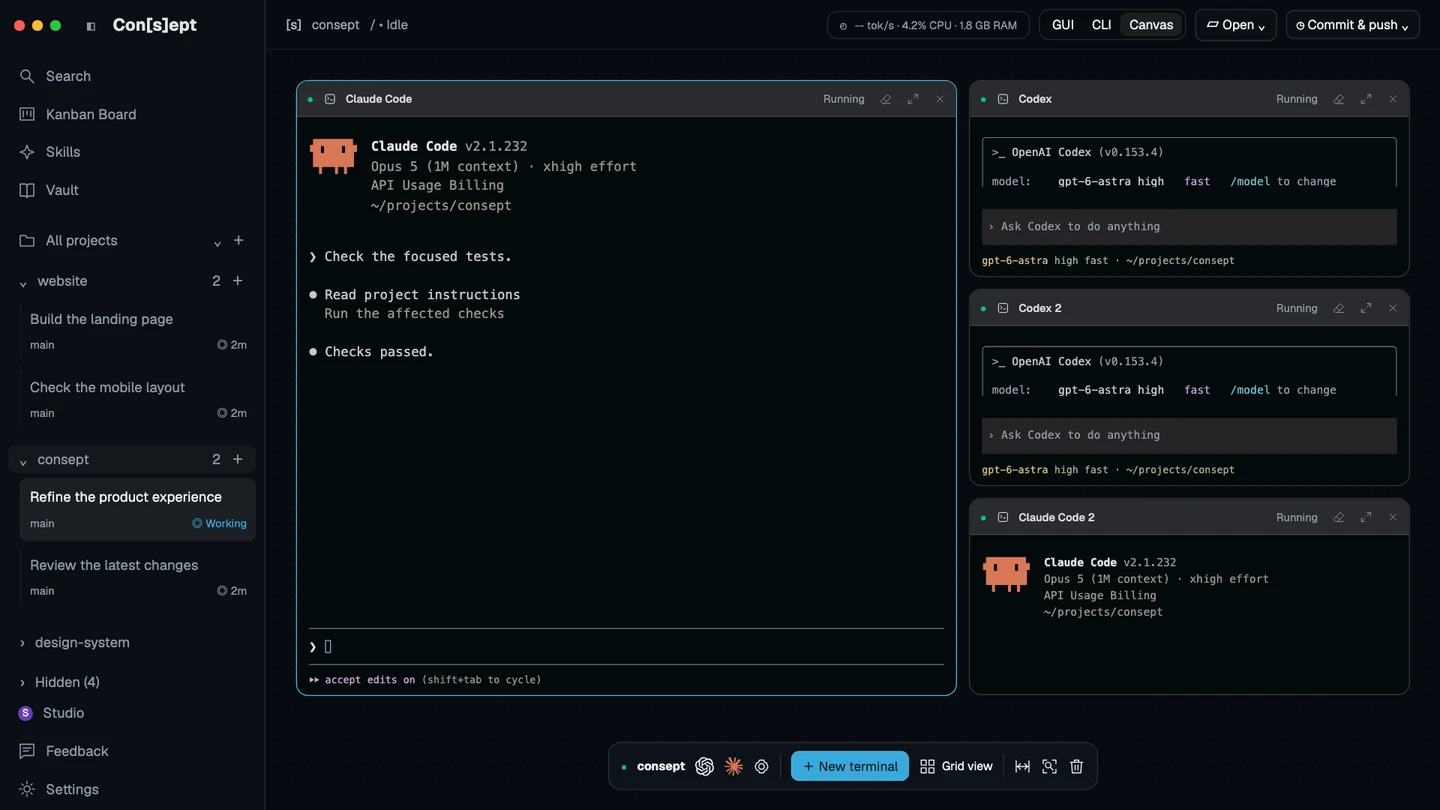
Give each task a place in Consept Canvas. Arrange several agent terminals in one workspace, follow their output side by side, and focus the session that needs your attention.
- Arrange terminal panes around the task
- Keep Codex and Claude Code sessions in view
- Focus one terminal, then return to the grid
- Keep your supporting commands close by
Your project’s memory.
Ready for what’s next.
Turn decisions, discoveries, and project rules into connected knowledge that stays useful beyond a single chat.
Give the next agent a head start.
Enable agent notes so supported agents can find useful context and save what they learn for future tasks.
See the bigger picture.
Explore linked notes in the graph. Follow a connection from a project decision to the reason behind it.
Keep knowledge you can use.
Search, read, and edit your notes. Your Vault lives with your project as plain Markdown files.
Your agents deserve a place to work.
One workspace for your agents, conversations, and project knowledge. Choose monthly or make it yours for life.
All future updates included with lifetime. Provider subscriptions and API usage are separate.
Eligible new accounts get a seven-day trial from their first app login.